I am using Virtualbox 2.2.0 beta, it worked well before I upgrade my kernel from 2.6.26 to 2.6.29, but it refused to start my vm just after the kernel upgrade:
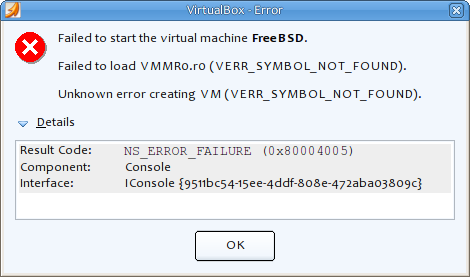 It said "VMMR0.r0 is importing g_SUPGlobalInfoPage which we couldn't find" in its log file, fortunate enough, I got to this page after I searched the web with this error message, there are already many people who met this problem with kernel 2.6.29, the solution is very simple: just uncomment "VBOX_USE_INSERT_PAGE = 1" in vboxdrv's Makefile, and compile the kernel module for virtualbox again, it should work.
For my Debian unstable, the target Makefile sits under /usr/share/virtualbox/src/vboxdrv, so I just uncomment that line, and run "/etc/init.d/vboxdrv setup" to re-compile the kernel module, then everything goes well, I can happlily virtualize my boxes again ;)
It said "VMMR0.r0 is importing g_SUPGlobalInfoPage which we couldn't find" in its log file, fortunate enough, I got to this page after I searched the web with this error message, there are already many people who met this problem with kernel 2.6.29, the solution is very simple: just uncomment "VBOX_USE_INSERT_PAGE = 1" in vboxdrv's Makefile, and compile the kernel module for virtualbox again, it should work.
For my Debian unstable, the target Makefile sits under /usr/share/virtualbox/src/vboxdrv, so I just uncomment that line, and run "/etc/init.d/vboxdrv setup" to re-compile the kernel module, then everything goes well, I can happlily virtualize my boxes again ;)
I am not familiar with debian's deb package build system, so I go through the process of building deb package from source at first.
- Install packages needed for building nginx
sudo apt-get build-dep nginx
sudo apt-get install fakeroot
- Get source code package:
mkdir $HOME/build/nginx -p
cd $HOME/build/nginx
apt-get source nginx
- Build it to generate deb package
cd nginx-0.6.32
dpkg-buildpackage -rfakeroot
Everything goes well, a deb package is generated under $HOME/build/nginx.
Then I continue to build nginx with wsgi support
- Checkout latest code of ( mod_wsgi for nginx)
cd $HOME/build/nginx
hg clone http://hg.mperillo.ath.cx/nginx/mod_wsgi/
- Edit $HOME/build/nginx/nginx-0.6.32/debian/rules, add additional options to the configure clause:
--add-module=${HOME}/build/nginx/mod_wsgi --with-debug
- Edit $HOME/build/nginx/nginx-0.6.32/debian/conf/nginx.conf, add these two lines to "http" section:
include             /etc/nginx/wsgi_vars;
wsgi_temp_path      /var/tmp/nginx_wsgi_temp;
- Copy file wsgi_vars from wsgi's conf directory to nginx's
cp $HOME/build/nginx/mod_wsgi/conf/wsgi_vars \
   $HOME/build/nginx/nginx-0.6.32/debian/conf/
- Edit $HOME/build/nginx/nginx-0.6.32/auto/install, and thses lines to it
test -f '\$(DESTDIR)$NGX_CONF_PATH' \
        || cp conf/wsgi_vars '\$(DESTDIR)$NGX_CONF_PREFIX'
cp conf/wsgi_vars '\$(DESTDIR)$NGX_CONF_PREFIX/wsgi_vars.default'
- Everything is ready now, compile nginx and generate deb package as before
cd nginx-0.6.32
dpkg-buildpackage -rfakeroot
Install the generated deb package with dpkg, it works.
The deb package I built can be downloaded from here.
After I reboot my xen-powered [Linux VPS](http://www.linode.com/?r=cd5198f9daf6a668424aea5534f74baf343f4759), I can't ssh into it any more, it keeps saying:
PTY allocation request failed on channel 0
This problem can be fixed by adding one line to /etc/fstab:
none /dev/pts devpts defaults 0 0
and run "mount -a" after it is added.
What confuses me is why it breaks just after I reboot it, but it works fine before, actually I didn't change anything since last time I rebooted it, maybe it's [Linode](http://www.linode.com/?r=cd5198f9daf6a668424aea5534f74baf343f4759) who changed some settings?
首先需要使用
Linode 的管理后台部署一个 64 位系统,利用它来安装 Gentoo,我选择了使用 CentOS,部署 CentOS 时我只使用了我一小部分的磁盘空间(2G),以便留下足够的空间给 Gentoo 使用。
是的,我承认我有点偏执有点疯狂,有点完美主义,我要使用 VPS+Gentoo 打造我的个人网络基地,所涉及到的软件和系统会有 Gentoo, Apache, Nginx, tinyproxy, daemontool, Blog, Trac 等等以及以后可能会使用的一些系统,还会涉及到 Linux 的安全配置和优化,借此记录一下完整的构建过程,留作日后参考。